
Automating Browser Work in Afina: Scripts, Modules, Groups
 Lucas
Lucas
 2026-06-29 16:00
The first sign that a multi-account operation has outgrown manual work is repetition. The same logins, the same warm-up clicks, the same checks, repeated across dozens or hundreds of profiles until the day is gone and the work has barely moved. Automation is what breaks that ceiling, but only if it runs in a way that stays believable rather than triggering the very systems you are trying to satisfy.
This guide walks through how Afina Browser handles automation, from no-code scripts to custom modules, task scheduling and AI-driven control. The focus is practical: what each layer does, when to reach for it, and how to keep automated activity looking like real use.
Running two or three profiles by hand is fine. The trouble starts when the count climbs, because the work scales linearly while your time does not. Every profile needs the same routine, and doing it manually means either long hours or cut corners, both of which lead to mistakes that link or burn accounts.
There is also a consistency problem. A human performing the same task hundreds of times will vary it slightly each run, which is good for looking natural but bad for reliability. Automation solves the reliability side, and when it is paced correctly it can keep the natural side too. The goal is not to remove the human entirely but to move them from clicking every step to deciding what should happen.
Afina’s automation starts with a visual, no-code builder, which means you do not need to write code to put a routine together. You open Automation, go to Scripts and click Create script, then assemble the flow on a canvas.
Building a scenario is a matter of dragging components from the left panel onto the canvas and connecting them. The blocks cover the actions a routine needs, such as clicks, transitions between pages and checks on what is present. An Auto-connect option links blocks quickly so you spend your time on the logic rather than the wiring. A fuller look at browser automation in Afina shows how these flows come together into something useful.
Once a script exists, it can run in normal, headless or browserless modes, so the same logic scales from a single profile you are testing to a large pool running quietly in the background. You build the flow once and decide later how visibly it runs.
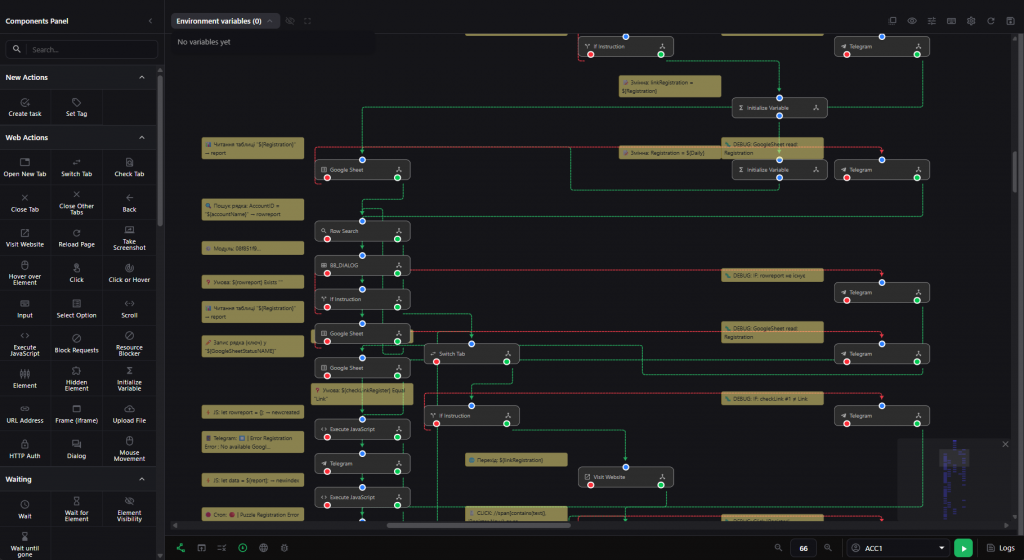
No-code flows handle most routines, but some tasks need logic that blocks cannot express. For those, Afina lets you write custom modules in JavaScript that run inside scripts using Node.js.
This gives you a clean path from simple to advanced. You start with the visual builder, and when a step needs real programming, you drop in a module rather than abandoning the tool or rebuilding everything in code. The way no-code automation logic and custom modules fit together is what lets a routine grow in complexity without becoming unmanageable.
Modules carry a security step worth knowing about. Any change to a module file requires re-signing, which you do by clicking the re-sign icon on the module card to update its signature. It is a small action that keeps custom automation both flexible and accountable.
Writing a script is one thing. Running it across many accounts without looking like a bot is another, and this is where task groups come in. A task group controls how a routine executes across a pool, governing parallel execution and scheduling.
he setup follows a clear sequence. You select accounts in the Accounts table, click the Set task icon in the top panel, then specify or create a task group. From there you set the number of active sessions, which caps how many run in parallel, and the script duration, then choose a schedule, select your script and add it.
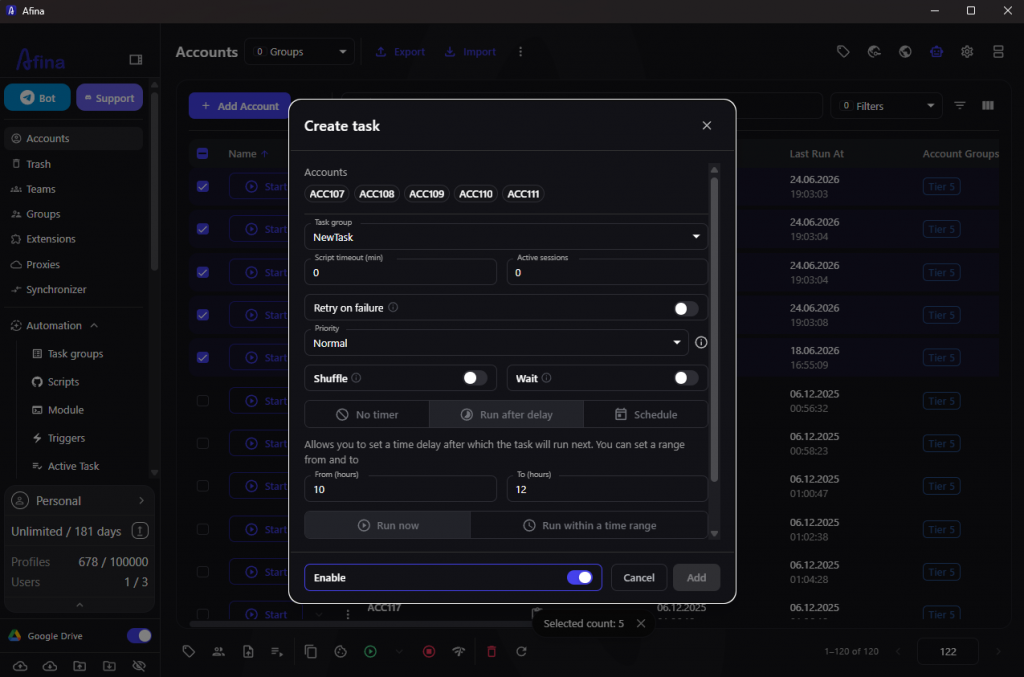
This matters more than it first appears. Automation that ignores pacing is as detectable as a shared fingerprint, because real users do not perform identical actions at the same instant. By spreading runs across shifts and capping parallel sessions, task groups keep warm-ups and routine work believable while still getting them done.
Not every routine has to be built from scratch. Afina includes an Automation Hub, a built-in catalog of ready-made scripts and modules you can pull straight into your workspace.
You open it from the left panel, use the search bar or filters to find a tool, and click Download on the card. The script or module then appears in your workspace automatically, ready to use or adapt. For common tasks this turns hours of building into minutes of selection, and for anyone new to automation it offers working examples to learn from instead of a blank canvas. It also keeps a team consistent, since everyone can draw from the same vetted catalog rather than reinventing the same flow.
The newest automation layer removes even the step of building scripts by hand. Afina exposes a local HTTP API on 127.0.0.1:50778 without cloud rate limits, and an official MCP server that connects AI agents such as Claude Code directly to that API.
Through this connection an agent can drive the platform programmatically. It can create and edit profiles with specific proxies and fingerprints, control active browsers to evaluate JavaScript, find inputs and take screenshots, write and sign custom modules, generate scripts on the fly and set up task schedules. The catalog of MCP automation scenarios shows how an agent turns a plain-language goal into real actions across many profiles, which raises the ceiling on what one operator can manage.
Powerful automation is only an advantage if it does not get the accounts flagged, so a few principles are worth holding to. The aim is for a pool of automated profiles to behave like a set of separate people, not one machine running a loop.
Underneath all of it, the data stays protected. Sensitive information is encrypted locally with AES-256 under a key file and master password that only you hold, so scaling your automation never means handing your credentials to someone else’s server. Automation gives you reach, and the local encryption keeps that reach yours alone.
Promo codes for new users:
Do I need to know how to code to automate tasks in Afina?
No. The visual, no-code builder lets you create routines by dragging and connecting blocks, and the Automation Hub offers ready-made scripts. Coding is only needed if you want custom logic through Node.js modules.
How does Afina keep automation from looking like a bot?
Task groups control parallel sessions and schedules, so routines run in measured shifts rather than identical simultaneous bursts. Pacing automated activity is what keeps it resembling real use.
What can an AI agent do through the MCP server?
Connected through the local API, an agent such as Claude Code can create profiles, run and generate scripts, write and sign modules, evaluate pages and manage task schedules, all without manual clicking.
Is my data safe while automation runs at scale?
Yes. Sensitive data is encrypted locally with AES-256 under a key file and master password that only you hold, so running automation across many profiles does not expose your credentials externally.
