ISP Proxies vs. Residential Proxies: Key Differences & How to Choose
2026-11-12 00:00
 Alex
When shopping for proxy services, teams often compare ISP proxies (commonly sold as static residential proxies) and rotating residential proxies. While both carry the “residential” label and even overlap in certain features—their underlying network lines and ideal use cases are completely different.
This guide breaks down where each proxy type actually comes from, their core strengths and limitations, and how to choose the right plan for your task.
What Are ISP Proxies (Static Residential Proxies)?
Definition and How to Tell Three Static Resources Apart
An ISP proxy uses an IP address registered under a broadband Internet Service Provider (ISP), hosted on servers inside a commercial data center. Because providers can assign these addresses to a customer for months or years at a time, these plans are widely known as static residential proxies.
The name “static residential” often makes buyers think the server sits inside a regular home. In practice, the three common static resources work quite differently: a true fixed home broadband IP connects through a physical household line; a static ISP proxy sends traffic from a datacenter server while still showing a broadband provider’s name in IP lookup tools; and a standard static datacenter proxy is registered directly to a cloud or hosting company (for more on household connections, see What Is a Residential IP Address?).
| Static Resource Type | Traffic Exits | Key Distinction & Buying Focus |
| Static ISP Proxy | Datacenter servers (using ISP-registered IPs) | Shows an ISP name, but is not a home line. Ideal for tasks needing an ISP identity and a long-term fixed IP; confirm renewal and dedicated terms before buying |
| True Fixed Home Broadband IP | Physical household or business broadband lines | Combines real home broadband with a long-term fixed IP. Limited by local broadband plans; confirm how remote access is set up |
| Static Datacenter Proxy | Datacenter or cloud server networks | Fixed IP address within a server subnet. Lower price; fits standard tasks that only need a fixed public IP where server subnets are not blocked |
Main Benefits of Static ISP Proxies
Hosting ISP-registered IP addresses inside commercial data centers gives static ISP proxies four practical advantages:
Fast speeds for continuous transfers: Data centers have plenty of bandwidth and stable routing. When loading image-heavy pages, transferring large files, or calling APIs at high frequency, datacenter servers stay fast without hitting the upload limits of regular home broadband.
Keep using the exact same IP after reconnecting: That IP is assigned to you for the full lease term. Even if you close your program tonight and restart it next week, you connect back to the exact same IP as long as your lease is active.
Fixed IP lists for easy management: Buying a static plan gives you a clear list of IPs, making it easy to assign specific addresses to testing or live tasks and track them in your logs. If your work cannot share IPs with other users, simply pick a dedicated plan.
24/7 uptime with minimal drops: Datacenter servers run around the clock without dropping offline because a homeowner turned off a computer, put a device to sleep, or rebooted a router. On batch jobs that run for hours, stable connections prevent frequent reconnects from slowing down your work.
Main Limitations of Static ISP Proxies
While fast and stable, static ISP proxies have three clear limits in location coverage and billing:
Limited locations and concentrated subnets: You can only pick from the datacenter stock a provider currently holds. Not only are small cities and regional carriers limited, but multiple static IPs bought together often sit in the exact same subnet.
Wasted monthly fees when used infrequently: When buying by IP count and lease term, you pay for the full month even if an address is used only once. Daily runs across a few fixed locations are cost-effective, but occasional checks across dozens of cities leave leased IPs sitting idle.
An ISP label does not guarantee every site will allow access: Seeing a broadband provider’s name in a lookup tool only means the IP is registered under that ISP, not that traffic passed through a home router. On websites with strict checks, static ISP proxies can still be blocked if the site flags server subnets—always test on your target pages before buying in bulk.
What Are Rotating Residential Proxies?
How Rotating Residential Proxies Work
A rotating residential proxy brings together real household broadband connections around the world into a large residential IP pool. When your browser or program connects to the proxy gateway, the system assigns a currently online home broadband line in your chosen location to forward the request, showing that household’s public IP to the target website.
During use, you can set your program to rotate IPs automatically, or turn on a sticky session to keep using the current home exit for a set time window (for more on per-request vs. timed switching, see our guide on what rotating proxies are).
Main Benefits of Rotating Residential Proxies
Drawing from a massive pool of real household lines lets rotating residential proxies solve four problems that static IPs cannot cover:
Traffic comes from real home broadband: When testing whether local residents can open a webpage, checking content targeted at home networks, or accessing pages that block server subnets, a real household connection is required.
Huge IP pools across multiple carriers: Residential pools combine lines from thousands of different homes and broadband providers. You can spread requests across diverse household exits without leasing fixed IPs one by one, making it easy to check how pages load across specific cities and carriers.
Switch countries and cities on demand: You can switch countries, states, or cities—and often filter by carrier—whenever your target market changes. For teams checking different regions each week, switching on demand is much more flexible than leasing fixed IPs in every city.
Get a new IP on every request, or hold one for a single flow: You can change IPs on every request when fetching independent pages, or turn on a sticky session when completing a connected sequence—like selecting a region, viewing a list, and clicking into a details page—so your page state does not reset mid-flow.
Main Limitations of Rotating Residential Proxies
Because they connect through everyday home devices, rotating residential proxies also have three natural limits:
Home devices can go offline anytime, and speeds vary: Whenever a homeowner turns off a device or disconnects from Wi-Fi, that exit drops offline. Even if the system automatically switches you to another home in the same city, speeds and latency vary from house to house, and an interrupted multi-step flow may need to start over.
Sticky sessions are temporary and cannot get the same IP back tomorrow: A sticky session can only hold your current IP for a few minutes to tens of minutes while that home device stays online. Once the session ends or you reconnect the next day, the pool assigns a new available node and cannot bring back yesterday’s IP.
Higher data costs when loading image-heavy pages: Rotating residential proxies are usually billed by data volume ($/GB). High-res images, frontend scripts, and failed retries all use up data—so loading heavy product pages will cost much more in traffic than fetching plain-text APIs over the same number of requests.
Static ISP vs. Rotating Residential Proxies: Key Differences
Comparing both proxy types in practice shows how they differ in connection stability, address control, and billing:
Underlying Lines and Connection Stability
- For consistent test conditions or multi-hour transfers (Choose Static ISP): When comparing page load speeds before and after a site update, your network environment needs to stay the same. Using the same static ISP exit routes both tests through the exact same server and line, so any speed change reflects the website itself. Likewise, stable datacenter connections keep multi-hour batch transfers running smoothly.
- For testing real local user environments (Choose Rotating Residential): If you need to check local store pages, regional ads, or access issues experienced by home users in a specific city, fast datacenter tests will not show what residents actually see. You need to pull real household exits from that city in a rotating residential pool.
ISP Proxies Can Rotate and Residential Proxies Can Hold an IP—Why Are They Still Different?
Some providers offer rotation on ISP proxies, while rotating residential proxies let you hold an IP with sticky sessions. The core difference is whether you get a fixed list of IPs you control long-term, or temporary access to borrow online IPs from a shared pool.
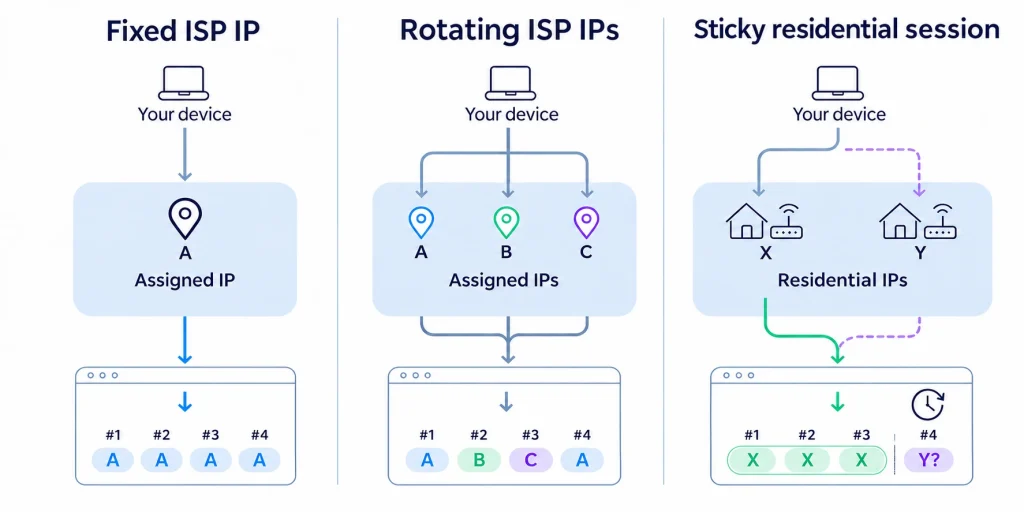
The diagram below uses letters to represent specific IP addresses (A, B, C for static ISP addresses; X, Y for rotating residential pool addresses) to show what choices you have after three requests in a row:
Looking at the diagram shows the clear boundary between the two setups:
- Why ISP rotation cannot replace a rotating residential pool: Even if you lease three static ISP addresses (
A,B, andC) and rotate through them, you are only looping through those same three fixed numbers. It will not switch you into new cities or real home broadband networks.
- Why sticky sessions cannot replace a static fixed IP: An
IP Xassigned from a residential pool stays the same while your sticky session is active—long enough to finish a continuous page flow. Once the session expires or you reconnect the next day, the pool assigns a different address (Y) and cannot lock in your original IP long-term like a static ISP plan.
Overview of Resource Attributes and Costs
The table below compares static ISP proxies and rotating residential proxies across seven key areas:
| Comparison Area | Static ISP Proxies | Rotating Residential Proxies |
| Network Source | Datacenter servers (using ISP-registered IPs) | Forwarded directly through currently online home broadband |
| Speed & Stability | Ample datacenter bandwidth for continuous, long-running jobs | Speeds and online time vary with each household’s connection |
| IP Retention | Use the exact same fixed IP throughout your lease (week/month/year) | Hold temporarily via sticky sessions; cannot get the same IP back across days |
| Rotation Scope | Switch within your leased IP list, or use an ISP pool included in the plan | Switch automatically across online home exits matching your location filters |
| Location Coverage | Limited by available datacenter stock and subnet distribution | Covers major cities and carriers worldwide on demand |
| Shared vs. Dedicated | Offered in both shared and single-user dedicated plans | Assigned dynamically from a shared pool; sticky sessions are not exclusive |
| Primary Billing | Billed by number of leased IPs and lease length | Billed by data used (GB) or purchased bandwidth and ports |
How to Choose Based on Your Actual Task
Once you see the differences, match your choice directly to the hard requirements of your task:
- Must keep the exact same IP long-term (Choose Static ISP): If a partner platform requires a fixed whitelisted IP, or your work manages fixed accounts across weeks or months, keeping the IP unchanged comes first. Before ordering, confirm that you keep the original IP after reconnects and renewals, and decide whether you need a single-user dedicated plan. If the site does not block server ranges, a standard static datacenter proxy works fine; if it requires a broadband provider identity, choose static ISP proxies.
- Need to collect pages across many cities or carriers (Choose Rotating Residential Pool): When your work covers dozens of cities or compares local pages across different broadband providers, switching exits on demand from a residential pool costs much less than leasing a large batch of static IPs. When testing local pages, remember to clear your browser cache, saved ZIP codes, and default account addresses first so local settings do not affect your location results.
- Only need to finish a single continuous flow (Choose Rotating Residential + Sticky Session): If your task just needs to complete a connected sequence—like searching, comparing prices, and viewing details—and can use a new IP on the next round, there is no need to lease fixed IPs long-term. Use rotating residential proxies with a sticky session turned on. If the task continues the next day and the website does not lock onto yesterday’s old IP, saving browser cookies and login states in your program is enough to keep going.
Conclusion
The core value of static ISP proxies is stable datacenter connections that do not drop and specific ISP addresses you can hold long-term. The core value of rotating residential proxies is pulling real home broadband exits across different cities and carriers on demand.
When choosing a plan, pick static ISP proxies if your work requires keeping the exact same IP across days or months, and pick rotating residential proxies if you need real home broadband or multi-city coverage. From there, compare total costs against your daily request volume to lock in the right setup.
Frequently Asked Questions (FAQ)
Do ISP proxies always have to use a single unchanging IP?
Not necessarily. While most plans assign fixed addresses for a lease term, some providers also let you switch across multiple leased ISP addresses or an ISP pool. When buying, just check one thing: after switching, can your program actively pick your original IP again, or does it only pull random IPs from a shared pool?
Can I get the original IP back after a rotating residential sticky session ends?
No. Once a sticky session ends, the system assigns other online nodes from the pool. If your work requires using the exact same IP the next day, buy a static plan that reserves specific addresses by lease term—reusing the same Session ID in your code will not hold a home broadband IP long-term.
Since static ISP proxies have more stable speeds, are they safer than rotating residential proxies?
Speed and stability only reflect transfer performance, not safety. Whether a target website allows your requests depends on its own filtering rules and needs to be tested on the live page; whether your business data stays safe depends on using encrypted connections (like HTTPS), protecting your credentials, and checking the provider’s logging policy.
Before buying, how can I confirm if a proxy is real home broadband, long-term fixed, or dedicated?
An IP lookup tool only shows the ISP name and usage type label. Before ordering, confirm three things directly with the provider: ① Does traffic exit through real home broadband or a datacenter server? ② Can the assigned IP be kept after reconnects and renewals? ③ During the lease, is that IP dedicated to one user or shared?