What Is a Residential IP Address? Differences, Detection, and How to Choose
2026-11-10 00:00
 Alex
When comparing network connections or proxy services, you will frequently run into terms like “residential IP,” “datacenter IP,” “residential proxy,” and “ISP proxy.” While they often appear on the same product pages, they describe very different things.
This guide breaks down their definitions and distinctions, and shares practical identification and selection methods.
What Is a Residential IP Address?
A residential IP is a public IP assigned to a home internet connection by an ISP. When you browse the web via your household Wi-Fi, websites see that single public address.
You don’t need a proxy just to use one—ordinary home browsing already does. When evaluating residential IPs for technical tasks, keep two realities in mind:
- Shared access: Multiple devices in your home share one public IP, and providers may use CGNAT to share an address across neighboring homes. A residential IP identifies a home network, not exclusive ownership.
- Dynamic assignment: Most ISPs assign dynamic IPs that change periodically or upon router reboot. “Residential” describes the network source, while “dynamic” or “static” indicates whether the address stays fixed.
How Is a Residential IP Different From Other IPs and Proxies?
Residential and datacenter IPs describe where a network connection comes from, whereas a proxy is a service that routes your traffic through another address. The table below breaks down how these four terms relate to each other:
| Term | What It Describes | Main Distinction |
|---|---|---|
| Residential IP | An IP assigned to a home internet connection | Describes the address’s household network source |
| Datacenter IP | An IP used by cloud or server infrastructure | Hosted in a data center rather than a home network |
| Residential Proxy | A service that routes traffic through home networks | Gives your application access to external residential IPs |
| ISP Proxy | A fixed-IP proxy using ISP-registered addresses | Registered to an ISP, but often hosted on datacenter servers |
Looking closer at the table, three comparisons matter most when evaluating products:
Residential IP vs. Datacenter IP
The core difference is the underlying network source. Residential IPs belong to consumer home broadband networks, while datacenter IPs belong to cloud providers and server facilities.
Target websites check this network background when filtering traffic. Requests coming from a commercial hosting network are much easier to flag than traffic coming from everyday home internet—especially on websites with strict anti-bot rules. That said, network type mainly affects how websites trust your connection; actual speed and stability still depend on routing distance and server load.
Residential IP vs. Residential Proxy
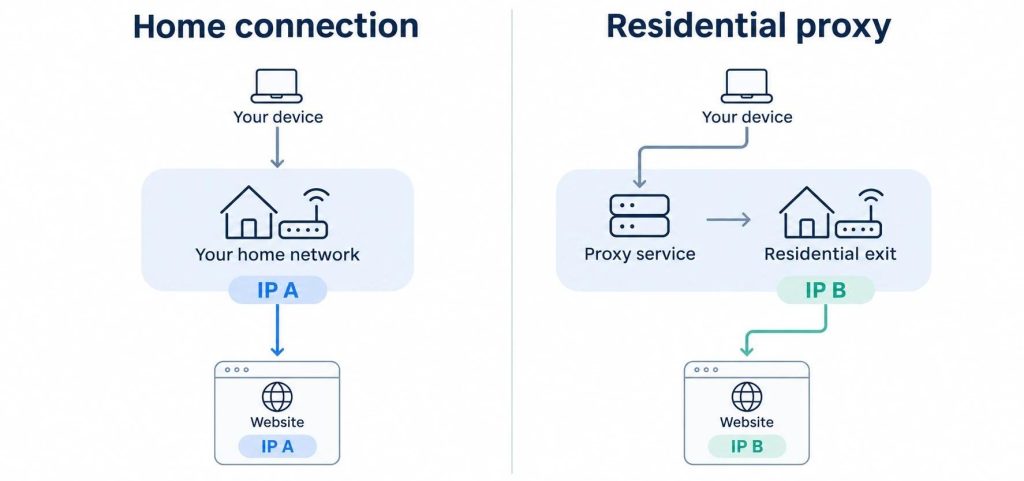
A residential IP is the address itself; a residential proxy is a service that lets your application send requests through residential connections in other locations.
send requests through residential connections in other locations. For example, if an e-commerce team needs to check public product listings across different countries, their own office internet only shows local results. By connecting through a residential proxy, their requests exit through household networks in those target regions—paying for flexible proxy access rather than setting up physical broadband lines abroad.
What About ISP Proxies?
ISP proxies (often called “static residential proxies”) sit between residential and datacenter resources. They use IP addresses officially registered under an internet service provider, but the servers handling the traffic are physically housed in data centers. For users, this distinction comes down to your task requirements: if you need a real household connection, look for standard residential proxies; if you need the same IP address to stay fixed for weeks or months with an ISP reputation, a static ISP proxy is the more reliable fit.
How Can You Check if an IP Is Residential?
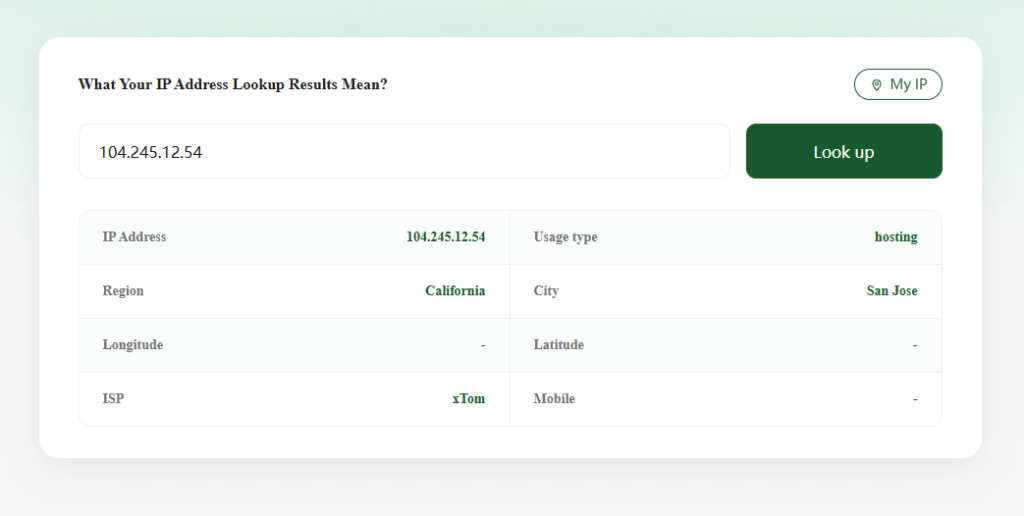
First, test the exact connection you plan to use. If you are checking a proxy, open ZooProxy’s free IP address lookup tool inside the browser or application configured with that proxy. The address displayed on the page is your outgoing IP.
Next, check the ISP / Organization name to see if it belongs to a known consumer broadband provider rather than a cloud host, and review the usage labels:
Residential: The database classifies the address as a consumer home connection.Hosting: The address is linked to a data center, cloud server, or hosting provider.ISP: Identifies the internet service provider managing the network block.
It’s important to note that an IP’s network provider and its usage type are two separate pieces of information. If you specifically need traffic to go through genuine home broadband, the simplest way is to check the product description or ask customer support directly.
How Do You Get a Residential IP—and Which Option Fits Your Needs?
You can use a residential IP directly through your own internet provider or access external addresses through a proxy service. Instead of getting lost in product names, match your choice to the task in front of you:
For everyday browsing or local access (Use your home ISP): If you only need a residential IP in your own city, your existing home broadband already provides one. If a platform requires a whitelisted IP from your home office, simply ask your local ISP whether they offer a static IP plan.
For multi-region research or large-scale data collection (Use rotating residential proxies): For tasks that require frequent switching of residential egress points, Rotating residential proxies is a good fit. When making your selection, compare its geographic coverage, session rules and traffic pricing based on your data volume.
For long-term account management or fixed-IP workflows (Use static ISP proxies): Tasks like managing fixed accounts or accessing IP-restricted systems cannot afford sudden IP changes. Static ISP proxies assign a dedicated, unchanging address for your entire subscription period—unlike temporary sticky sessions, which only hold an IP for a few minutes and cannot replace a true static connection.
Conclusion
Ultimately, the value of a residential IP hinges on its ability to run your tasks reliably. Confirm the network origin first, distinguish whether you require a forwarding proxy or a server, and validate accordingly. This lets you select the right product amid all the confusingly similar offerings.