What Is a Rotating Proxy? How IP Rotation Works & Use Cases
2026-11-09 00:00
 Alex
If you have ever tried visiting the same website repeatedly or checking hundreds of pages in a short window, you have probably run into CAPTCHAs, rate limits, or sudden connection drops. The reason is simple: to a target website, a surge of repetitive requests coming from a single IP address does not look like normal human browsing. To keep connections running smoothly during ongoing access, teams need to route their traffic through different network addresses. That is exactly the problem a rotating proxy solves.
This guide breaks down what a rotating proxy is, how IP rotation works under the hood, the main proxy types, common business use cases, and the pros and cons to weigh when choosing a setup for your workflow.
What Is a Rotating Proxy?
A rotating proxy is a proxy service that automatically switches your exit IP address based on preset rules. With a traditional proxy connection, your application stays tied to a single fixed address from start to finish. Once you connect to a rotating proxy, however, the backend IP pool continuously assigns fresh exit addresses to your traffic. From the target website’s perspective, those incoming requests are not coming from one place—they are spread across many different network endpoints.
The main goal of this mechanism is to distribute high-volume web requests across multiple IPs so you can sustain frequent access without overloading a single connection. When the service also supports geo-targeting, you can pick exit IPs in specific countries or cities to view local website content directly.
How Does IP Rotation Work?
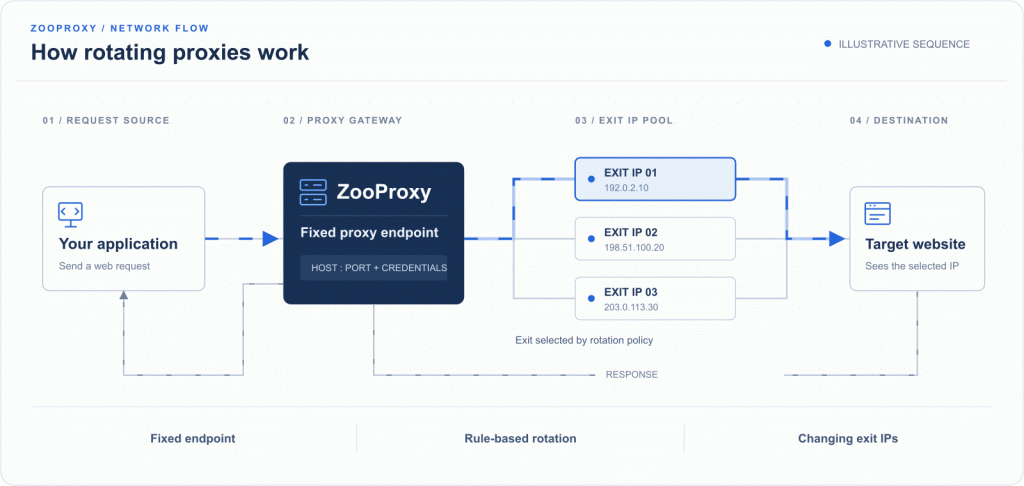
Most rotating proxy services give you a single entry address (gateway). The proxy endpoint your application connects to stays the same, while the proxy server behind the scenes pulls addresses from its proxy pool and forwards your requests through different exit IPs. In practice, this routing happens automatically in three steps:
Connect to the proxy gateway: Enter the provider’s gateway address, port, and credentials into your proxy tool. All outgoing requests go to this fixed entry point first.
Assign an address from the IP pool: When the proxy server receives a request, it matches you with an available exit IP from its backend pool.
Forward and return the response: The request reaches the target website through that assigned exit IP, and the website’s response travels back to your application along the same path.
When Does a Proxy IP Change?
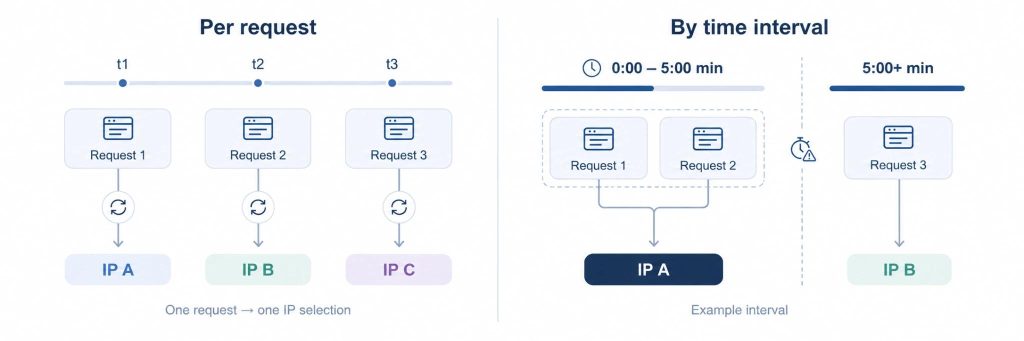
When your exit IP switches depends on the rotation rules you configure. The two most common methods are:
- Request-Based Rotation: Every time your program sends a new web request, the proxy service automatically assigns a fresh exit IP. This works well for checking large batches of independent public pages—such as scraping product catalogs or checking keyword rankings—where requests do not need to share a login state.
- Time-Based Rotation: The proxy service switches the exit IP at fixed intervals (for example, every 5, 10, or 30 minutes), while all requests sent within that time window share the current address.
What Is a Sticky Session?
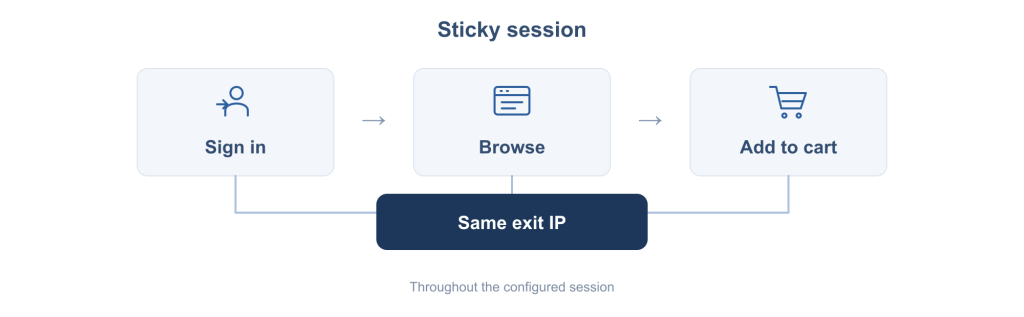
When interacting with a website, a sequence of connected actions makes up a “session”. Some multi-step workflows break if your IP changes on every single page load—and that is where a sticky session comes in.
When you enable a sticky session, the proxy service holds the same IP for your specified duration (such as 10 or 30 minutes) across consecutive requests until the timer runs out. This mode is built for continuous actions like logging into an account to browse multiple pages, stepping through pagination, or adding items to a cart before checking the final checkout price.
What Types of Rotating Proxies Are Available?
While “rotation” describes how IPs switch, “residential, datacenter, and mobile” describe where those IPs come from. Different IP sources carry different trust levels, speeds, and costs. Here are the three main types used today:
Rotating Residential Proxies
Rotating residential proxies come from home internet connections assigned to everyday households by Internet Service Providers (ISPs). Because every request routes through a genuine residential IP, target websites treat the traffic like regular home browsing. Combined with location targeting, you can view local web pages just as a resident in that region would. This natural footprint makes them a strong fit for cross-region market research, price tracking, review aggregation, and search result monitoring—though actual results still depend on the target site’s access rules and keeping a reasonable request rate.
Datacenter Proxies
Unlike residential proxies, datacenter proxies use IPs hosted on cloud providers or server facilities rather than home networks. Server infrastructure brings clear advantages: high throughput, fast response times, and a much lower price tag than residential traffic. The trade-off is that datacenter IP ranges are relatively concentrated and public, making it easier for strict websites to flag the traffic as non-residential. As a result, they work best for high-speed, budget-conscious tasks on target websites with more permissive access rules.
Mobile Proxies
Rotating mobile proxies use IP addresses assigned directly by mobile carriers (4G/5G cell towers), routing your requests through real cellular networks. In everyday mobile networks, hundreds of phones naturally share and cycle through the same cell tower IPs, so websites tend to give mobile IP ranges a high level of trust. If you need to verify mobile ad placements, test how mobile pages load, or inspect carrier-specific content, mobile proxies are a natural match. Keep in mind, however, that a mobile IP alone will not automatically trigger a mobile page layout—you also need to pass matching mobile browser headers (User-Agent) and screen dimensions.
For a quick side-by-side comparison, here is how the three types stack up:
| Proxy Type | IP Source | Key Characteristics | Best Use Cases |
| Rotating Residential | Home internet connections (ISPs) | Broad regional coverage; resembles real home users; billed by traffic at a higher relative cost | Price monitoring, SERP tracking, cross-region market research, and review collection |
| Datacenter Proxies | Data center or cloud servers | Fast response speeds and lower cost, but easier for strict websites to identify | Speed- and budget-sensitive large-scale collection on permissive target sites |
| Mobile Proxies | Mobile carrier networks (4G/5G) | Real cellular network environment; higher cost with smaller pools in specific regions | Mobile ad verification, mobile app testing, and carrier environment checks |
Common Use Cases for Rotating Proxies
In day-to-day operations, a rotating proxy serves as the underlying network layer that distributes requests and switches exit IPs, while your scraping or monitoring tool handles data extraction and parsing. Below are the most common ways teams use rotating proxies:
- Price Monitoring: Retailers and e-commerce teams regularly track competitor pricing, promotional discounts, and stock levels across marketplaces. By switching exit IPs and applying location targeting, teams can continuously collect local market data to guide daily pricing adjustments and inventory restocking.
- SERP Monitoring and SEO Tracking: The same keyword often produces very different search results depending on where the query is made. SEO teams rely on SERP monitoring with rotating proxies—setting specific language and device parameters—to pull accurate ranking data in bulk from target regions, tracking organic positions, ad placements, and competitor visibility over time.
- Review Monitoring: Brands and cross-border sellers need to stay on top of new customer reviews, star rating shifts, and recurring support complaints across platforms. Aggregating feedback from multiple sites helps product and support teams spot quality issues early and protect brand reputation.
- Website Testing and Monitoring: Rotating proxies are also widely used for scheduled checks across thousands of target URLs—tracking changes to product specs, terms of service, or help documentation. Keeping location and language settings consistent during these checks filters out regional page variations so teams only capture real content updates.
Benefits of Using Rotating Proxies
Deploying rotating proxies in automated data collection and routine monitoring brings three practical advantages:
Distribute Request Load Across Multiple IPs: By using rotating IPs that switch per request or at set time intervals, a proxy service spreads heavy traffic across many addresses in the pool. This keeps your workflow from burning out a single IP and provides a more flexible way to manage sustained connections.
Access Location-Specific Content: When your proxy service supports geo-targeting, it can supply exit IPs from specific countries or cities. This lets your team view local web pages directly from the network perspective of your target market.
Eliminate Manual Proxy Maintenance: With automatic IP rotation, the proxy server handles address switching based on your preset rules, so your team no longer has to manually maintain proxy lists or swap out addresses in scripts.
Limitations of Rotating Proxies
Like any proxy setup, rotating proxies have their boundaries. Knowing these limitations upfront helps you make informed choices and set realistic expectations:
IP Rotation Does Not Guarantee Access Every Time: Modern anti-bot systems (such as Cloudflare) look at much more than just your IP address—they also evaluate request headers, browser fingerprints, cookie states, and request speed. Even with constant IP rotation, sending requests too aggressively or using inconsistent browser signals can still trigger CAPTCHAs, rate limits, or blocks.
Frequent IP Switching Can Break Session Continuity: Certain tasks require the same IP across multiple pages, such as logging into an account to run multi-step actions, browsing items and adding them to a cart, or completing a checkout flow. Switching IPs on every request will interrupt the session and force re-verification; for these workflows, enabling sticky sessions or using a static proxy is the better route.
Costs and Connection Performance Can Fluctuate: First, residential and mobile rotating proxies typically bill by traffic ($/GB)—the heavier the pages and the more retries you run, the higher your bandwidth bill climbs (for sustained, high-concurrency scraping with heavy traffic, teams can also look into bandwidth-billed unlimited residential proxies). Second, because your exit IP keeps changing, differences in individual node quality can cause variations in connection speed or latency. Finally, available IPs in smaller countries or remote cities are naturally limited, so you cannot judge local pool depth solely by a provider’s advertised global IP count.
Rotating Proxies vs. Static Proxies: What Is the Difference?
When both options use proxy IPs, why do some workflows call for constant rotation while others require a fixed address? The core difference comes down to whether your exit IP is dynamically assigned by rules or locked in for the duration of your lease.
| Feature | Rotating Proxy | Static Proxy |
| IP Usage | Switches automatically per request or time interval, or holds temporarily via sticky sessions | Stays fixed throughout the subscription period unless manually replaced |
| Primary Use Cases | Large-scale data collection, price monitoring, SERP tracking, multi-region market research | Daily account management, fixed platform logins, API IP whitelisting |
| Session Continuity | Short-term continuity from a few minutes up to tens of minutes via sticky sessions | Long-term consistent identity without interruptions from routine rotation |
| Location Selection | Flexibly switches between countries or cities covered by the IP pool | Locked to the specific country or city of the assigned IP |
| Management Focus | Rotation rule setup, concurrency control, and bandwidth cost tracking | Long-term uptime stability and replacement handling for individual fixed IPs |
In short, if your task needs to spread web requests across a large number of different IPs, rotating residential proxies are far more efficient. However, if a platform expects a consistent access source or your workflow requires keeping the exact same IP identity over the long haul, static ISP proxies are the right fit—keep in mind that a short-term sticky session only holds an address temporarily and cannot replace a dedicated static IP.
Conclusion
For teams looking to scale up web request volume, a rotating proxy is a practical piece of network infrastructure. While it is not a silver bullet—you still need sensible request pacing and proper session handling—matching the right proxy type (residential, datacenter, or mobile) and understanding how to rotate IP addresses with the right rules for your target website will streamline your daily workflows and keep operations running smoothly.