Datacenter vs Residential Proxies: Differences & How to Choose
2026-11-16 00:00
 Alex
Both datacenter and residential proxies allow your application to route requests through alternative network exits, but their IP sources and underlying infrastructure are fundamentally different. As a result, they are built for entirely different tasks.
This article breaks down the resource characteristics, core advantages, and limitations of each proxy type. We will explore their key differences in detail and provide a practical framework to help you choose the right setup for your specific workflow.
What Are Datacenter Proxies?
Datacenter proxies forward traffic through servers using IP addresses registered to cloud providers, colocation facilities, or web hosts. When you connect to a target website, the server sees traffic coming from a commercial hosting network rather than your local machine (for a closer look at how they work, see What Are Datacenter Proxies?).
Note that physical server location alone does not define the proxy category—what matters here is that the exit IP itself belongs to a datacenter or hosting network range.
Pros of Datacenter Proxies
Because datacenter hardware, power, and high-speed backbone lines are managed under one roof, providers can monitor server load and allocate bandwidth without relying on external consumer devices staying online.
This centralized setup delivers three practical advantages:
- Built for sustained, high-volume workloads: Datacenter servers stay online 24/7 with consistent bandwidth, making them well suited for high-concurrency tasks, scheduled monitoring, and large data transfers.
- Flexible IP assignment and long-term retention: Because the provider controls the servers directly, you can rent static IPs for months or years, rotate through shared address pools, or purchase dedicated IPs reserved exclusively for your team.
- Predictable, lower operating costs: Managing thousands of IPs on centralized hardware keeps overhead low. Plans are typically billed by IP count, subscription term, or fixed bandwidth, keeping costs predictable even during heavy data transfers.
Limitations & Best Use Cases
The limitations of datacenter proxies also stem directly from their commercial network origin:
- No household footprint: Major platforms easily identify hosting subnets. While datacenter IPs work smoothly on standard websites, they are more likely to encounter network constraints or require retries on platforms with strict requirements.
- Higher block rates on heavily protected sites: Major e-commerce platforms, ticketing sites, and search engines routinely flag commercial hosting subnets. While datacenter IPs work smoothly on many public websites, they are more likely to trigger CAPTCHAs or rate limits on strict targets.
- Concentrated subnet distribution: Even when a provider offers thousands of datacenter IPs, those addresses are often grouped within a small number of facilities and contiguous subnets rather than spread across diverse local networks.
Best suited for: Tasks on public websites that do not constrain server ranges. They are ideal for workflows requiring fast response times, long-term static IPs, and tight cost control (such as uptime monitoring or standard web scraping).
What Are Residential Proxies?
Residential proxies route your requests through real home internet connections assigned by consumer ISPs to homeowners. They allow your application to access the web through household network exits around the world without having to set up and maintain local connections yourself (to learn more about residential IP attribution, see What Is a Residential IP Address?).
In this comparison, residential proxies refer specifically to connections that exit through actual household broadband lines.
Pros of Residential Proxies
When the network origin itself matters to your task, residential proxies offer capabilities that server networks cannot replicate:
- Authentic consumer ISP attribution: If users on a specific home broadband provider report a broken page, or if a site only displays localized pricing to local residents, routing traffic through a residential IP in that region lets you see the exact page local users see.
- Granular city and ISP diversity: Because residential nodes follow real population centers, they span far more cities, consumer ISPs, and independent subnets than datacenter facilities. This makes it easy to compare localized web content across multiple regional markets from a single script.
- Automated rotation and sticky sessions: Providers organize distributed home connections into a unified pool. You can rotate to a fresh residential IP on every request or enable sticky sessions to keep the same household exit across a multi-step workflow.
Limitations and Suitable Tasks
Because traffic passes through external household routers and consumer broadband lines, residential proxies come with practical constraints:
- Variable connection speed and uptime: Home devices fluctuate in speed and can disconnect without warning. If a host drops mid-task, your session will either face an interruption or switch to a new IP, which may require a retry.
- No long-term retention of a single IP: Sticky sessions can hold an exit for 10 to 30 minutes to complete a checkout or search flow, but you cannot lock in the exact same household IP across weeks or months.
- Tighter local supply and per-GB billing: Filtering for a small city and a specific ISP narrows the number of online peers available at that moment. In addition, residential proxies are usually billed by data transferred ($/GB), so scraping image-heavy pages or running into frequent retries will increase your bill.
- Ethical sourcing requirements: Because residential networks rely on end-user connections, reputable providers should clearly document how peers consent to participate, how bandwidth is shared, and how users can opt out at any time.
Best suited for: Workflows explicitly requiring a real household footprint, granular city-level targeting, and data collection on platforms with strict requirements that constrain commercial IPs.
Key Differences Between Datacenter and Residential Proxies
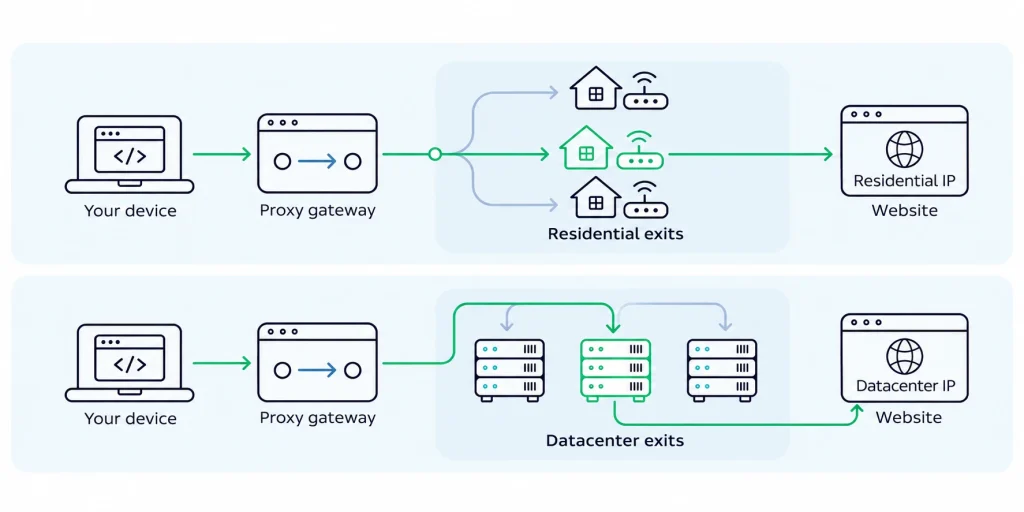
Beyond their basic definitions, comparing these two proxy types across five operational factors helps clarify how they behave in production:
IP Origin & Trust
The primary difference is the network identity attached to your requests: datacenter IPs belong to cloud or hosting providers, while residential IPs belong to consumer ISPs. Websites inspect this registration data to distinguish automated server traffic from everyday household visitors.
However, websites do not make access decisions based on IP origin alone. Two signals work together to determine whether your request goes through:
- Network attribution: On standard public websites, datacenter and residential IPs often perform identically. On heavily protected e-commerce, ticketing, or search platforms, hosting subnets are frequently filtered out upfront, whereas residential IPs blend in with normal consumer traffic and achieve higher initial pass rates.
- Request behavior and session state: Even a genuine residential IP will get blocked if you send dozens of requests per second from the same address, or if your browser cookies, headers, and account state look inconsistent.
A residential IP is not an automatic pass against anti-bot rules, and a datacenter IP is not guaranteed to fail. When evaluating options, separate whether your task strictly requires a home ISP line from whether the target site actually blocks server IPs in practice.
Speed & Performance
On a hardware level, datacenter proxies run on enterprise servers connected directly to high-speed fiber backbones, giving them lower single-request latency and steadier uptime. Residential requests travel through home routers and consumer broadband lines, so latency and connection length naturally vary from peer to peer.
In real workflows, however, raw ping speed is not the same as finishing a job faster. When comparing performance, look at three distinct metrics:
- Response time: How quickly a single request returns data from the server.
- Connection continuity: Whether the exit stays online long enough to finish a multi-step interaction without dropping.
- Effective completion rate: Whether your script actually receives the complete, valid target page within your time window.
A datacenter proxy that returns a CAPTCHA page in 40 milliseconds does not advance your task. Conversely, a residential connection that takes a few hundred milliseconds longer per request—but consistently returns complete page data without retries—will finish the overall job much faster.
Geographic Coverage and Network Diversity
Datacenter coverage is limited to the cities where a provider operates or leases server racks. Residential coverage follows everyday internet users across thousands of towns and regional ISPs. While both proxy types cover dozens of countries, they offer very different levels of granularity:
- Country-level access: If your job only requires an exit IP in a specific country (such as the US or Germany) without city or ISP constraints, either proxy type can handle the task.
- City- and ISP-level diversity: If you need to verify localized content across dozens of specific cities, or compare pages across different consumer ISPs, Autonomous Systems (ASNs), and dispersed subnets, concentrated datacenter IP blocks will fall short—making residential proxies the practical choice.
Always distinguish between advertised coverage and live availability. A city listed on a pricing page only shows that peers exist there; having enough active nodes online when your script runs determines whether the job succeeds.
Geographic Coverage
Both datacenter and residential proxies support automatic IP rotation and session persistence (for details on how rotation rules work, see What Is a Rotating Proxy?). The real operational difference comes down to how long you can keep the exact same IP address:
- Datacenter proxies: Because IPs are bound to controlled servers, you can lease the exact same static IP for months or years, and choose between shared pools or dedicated addresses reserved solely for your account. This makes them ideal for IP allowlisting or maintaining fixed login environments.
- Residential proxies: Because exits depend on external home routers staying online, sticky sessions can only hold an address temporarily during a single workflow window—you cannot lock in the same household IP across weeks or months.
Cost & Billing
Pricing differences between the two categories reflect what it costs providers to build and maintain each network:
- Datacenter proxies: Hardware, bandwidth, and IP leases are consolidated inside data centers. Because overhead is spread efficiently across servers, plans are typically billed by IP count, rental term, or fixed bandwidth. Within your plan limits, transferring more data does not drive up your bill.
- Residential proxies: Providers must continuously recruit, maintain, and route traffic across millions of distributed household nodes, so plans are typically billed by data transferred ($/GB). Scraping media-heavy pages or dealing with frequent connection retries will directly increase usage costs.
Because the billing units differ, comparing the unit price of a monthly datacenter IP against a per-GB residential plan tells you very little. Instead, compare the total cost to complete the same task: if both proxy types can reliably collect the target data, choose the one with the lower total outlay; if the target website strictly blocks server ranges, residential traffic becomes a necessary operational cost.
Comparison at a Glance
The table below summarizes how the two proxy types compare across six core dimensions:
| Dimension | Datacenter Proxies | Residential Proxies |
| Network Exit Source | Enterprise server networks in cloud, colocation, or hosting facilities | Real household broadband lines assigned by consumer ISPs |
| Speed & Performance | Fast single-request latency and steady uptime; more prone to blocks on strict sites | Speed and uptime vary by household line; higher effective completion on strict sites |
| Location & Subnet Spread | Tied to server facility locations; IPs often grouped in contiguous hosting subnets | Follows real population and ISP distribution; supports city, ISP, and ASN filtering |
| IP Retention & Control | Supports rotation, shared, or dedicated plans; can keep the same static IP for months | Supports rotation and short sticky sessions; cannot lock in one home IP long-term |
| Primary Billing Model | Usually billed by IP count, term, or bandwidth; cost-effective for heavy transfers | Usually billed by traffic volume ($/GB); heavy pages or retries increase total cost |
| Best Fit Conditions | Target sites allow hosting traffic, and tasks prioritize speed, static IPs, or low cost | Tasks require a real home ISP footprint, city/ISP granularity, or access to strict sites |
Which One Should You Choose?
Choosing between the two comes down to the access rules of your target website and the operational demands of your task:
- Running sustained, high-volume or bandwidth-heavy tasks: If your target websites do not block commercial server ranges (such as monitoring your own site or collecting standard public web pages), start with datacenter proxies. Server lines deliver faster response times and steady uptime, while per-IP or fixed-bandwidth billing keeps large-scale data transfers affordable.
- Requiring a real household broadband environment: When target platforms strictly impose strict requirements on hosting subnets, or when you need to switch across specific cities and consumer ISPs to verify localized page content, choose residential proxies to route traffic through genuine household exits.
- Keeping the exact same IP over weeks or months: If your workflow requires registering a fixed IP on an allowlist or maintaining a consistent login address long-term, temporary sticky sessions on rotating residential proxies will not suffice. Depending on whether the target platform checks for a consumer ISP label, choose between static datacenter proxies and static ISP proxies.
- Splitting traffic within a multi-step workflow: For complex projects, combining both proxy types is often the most cost-effective approach—route standard directory or listing pages that allow server IPs through datacenter proxies, and reserve per-GB residential proxies strictly for protected pages that enforce household broadband checks.
Before committing to a large plan, run a small test using a representative task on your actual target website: confirm that enough nodes are online in your target cities, verify that responses return complete page data, and measure the real traffic consumed to ensure the total cost fits your budget.
Conclusion
The core distinction between datacenter and residential proxies is whether your traffic exits through centrally managed server infrastructure or real household broadband connections. That difference shapes how addresses are distributed, how long an IP can be retained, and how plans are priced—though neither category guarantees success on every website by label alone.
By checking whether your task requires a household ISP footprint, testing candidate proxies against your actual target pages, and calculating the total cost per completed job, you can select—or combine—the right proxy resources with confidence.
Frequently Asked Questions (FAQ)
Are datacenter proxies always faster than residential proxies?
Not necessarily. Datacenter proxies run on high-speed server backbones, so their baseline latency for a single request is typically lower. However, real-world task speed also depends on routing distance, server load, and whether the target website challenges hosting IPs. If a datacenter IP triggers frequent CAPTCHAs and retries, completing the overall job can take longer than using a residential proxy.
Are residential proxies guaranteed not to get blocked?
Residential proxies have a clear advantage on strict websites because their IPs belong to everyday consumer ISPs. Still, they do not make your requests immune to blocks—if you send requests far faster than a normal human browsing pace from a single residential exit, or carry inconsistent browser cookies and session states, target websites will still restrict access.
Can both datacenter and residential proxies use static or rotating IPs?
Yes. Network origin and IP rotation are independent features. Datacenter proxies can be leased as long-term static IPs or rotated through a pool; residential proxies can rotate on every request or hold an address temporarily via sticky sessions. However, dynamic residential proxies cannot lock in the exact same household IP across weeks or months the way static server IPs can.
Where do ISP proxies fit between datacenter and residential proxies?
ISP proxies (often called “static residential proxies”) combine traits of both categories: their IP addresses are registered under consumer broadband providers (ISPs), but the proxy servers themselves are hosted inside data centers. This gives them consumer ISP attribution alongside datacenter speed and long-term static IP retention, though their traffic does not pass through actual home routers (for a full breakdown, see What Are ISP Proxies?).