What Is a Residential Proxy? How It Works, Benefits & When to Use It
2026-11-16 00:00
 Alex
For everyday browsing, your local internet connection is all you need. However, when your work requires viewing a website from another country or city, a fixed local connection quickly becomes a bottleneck—many sites restrict access or change what they display based on your IP address.
A residential proxy solves this by letting you route requests through real household internet connections in other locations directly from your own device. This guide explains how residential proxies work, why their network source matters, how to analyze the results you get, and when they are worth using.
What Is a Residential Proxy?
A residential proxy is a proxy service that routes your web requests through a real home broadband connection. Your browser or program still runs on your local machine, but the outgoing connection reaches the target website from a household network, showing that home’s public IP address (for basics on household IPs, see What Is a Residential IP Address?).
It helps to distinguish between a “residential IP” and a “residential proxy.” A residential IP is simply the network address assigned to a home by an Internet Service Provider (ISP). A residential proxy is the complete service that connects your tool, routes your traffic, and assigns available home exit nodes. Knowing a residential IP address does not give you a way to send traffic through it.
While your own home Wi-Fi is also a residential connection, its location is fixed—you cannot switch it to another city or ISP at will. A residential proxy service pools available home connections across different regions into a single access point. Instead of setting up internet lines in each target market yourself, you can connect to the proxy service and use local home networks on demand.
How Do Residential Proxies Work?
Most residential proxy services give you a single gateway address. Your application connects to this fixed entry point, while the proxy server assigns available household exit IPs in the background. A typical request goes through four steps:
- Assign a residential exit: The proxy server matches your request with an online household node based on your location and session settings.
- Connect to the proxy gateway: You enter the proxy address, port, and login credentials into your browser or tool and send a request.
- Reach the target website: The request goes out through that home broadband line, so the website sees a local resident’s public IP.
- Return the response: The webpage data travels back through the proxy connection to your tool.
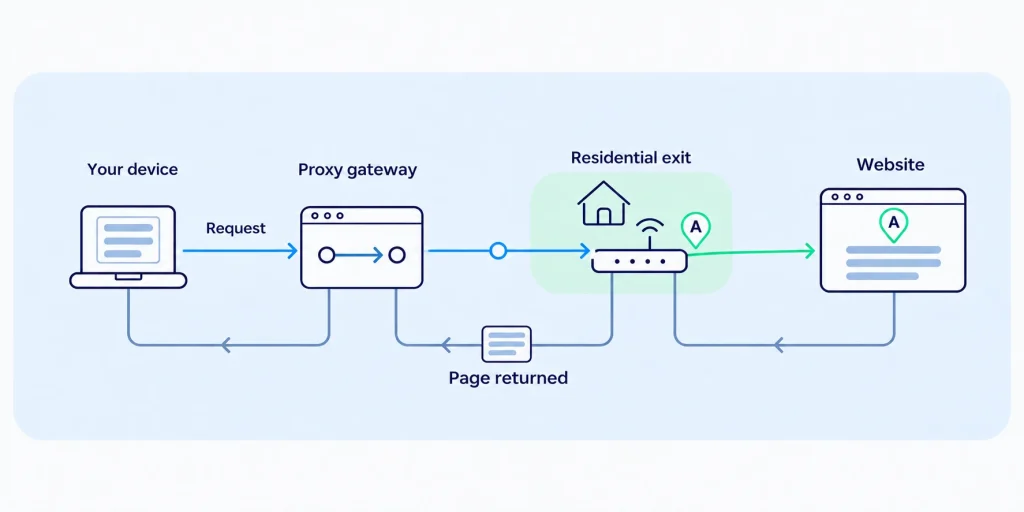
In this setup, the proxy gateway address you connect to is separate from the actual exit IP the website sees. How the service assigns those exit IPs depends on your session rules:
- Rotating mode assigns a new home IP on every request or at set intervals to spread out traffic across multiple addresses.
- Sticky sessions keep the same home exit IP for a set period so you can complete multi-step tasks without interruption.
Keep in mind that “residential” describes where the network comes from, while “rotating” or “sticky” describes how IPs are switched. Using a residential proxy does not mean your IP changes on every single click (for details on switching rules, see What Is a Rotating Proxy?).
Key Benefits of Using Residential Proxies
The practical value of a residential proxy comes down to three things: the household network it uses, the regions and ISPs it covers, and how it manages multiple exit nodes.
Access Through Real Home Broadband
Websites often apply different rules depending on where traffic originates. Datacenter IPs belong to cloud hosts and server facilities, making them easier for e-commerce sites, ticketing platforms, or search engines to flag during repeated visits. Residential proxies use IPs registered to consumer ISPs and assigned to everyday households, so your requests look like standard home browsing traffic.
This is especially useful when testing how a site performs on residential networks. For example, if users in a specific region report that a page fails to load while everything looks fine from your office or cloud server, routing a test request through a local ISP’s residential exit lets you check the actual household network path and see if the issue is tied to a specific carrier.
That said, a residential proxy only provides the household network exit. It does not guarantee every request will succeed—device types, browser versions, and local router settings still need to be checked separately, and a single test does not represent every household user.
Coverage Across Regions and ISPs
Online stores, local service platforms, and search engines frequently tailor pages based on a visitor’s city and carrier. On Google Search, for instance, your IP location is a major factor in which local results appear. Residential proxies bring together home connections from different countries, cities, and ISPs, allowing you to check regional pricing, local inventory, and search results directly from your target market.
When evaluating a provider’s coverage, look at four separate metrics rather than treating them as the same thing:
- Total IP pool size: The cumulative number of IPs the provider has connected over time.
- Country and city coverage: Which specific markets you can target.
- ISP diversity: Whether you can test different broadband carriers within the same region.
- Currently online nodes: How many home exits are actually active and available when you run your task.
Multiple residential IPs are only useful if they cover the specific locations and networks your task requires. Even if a provider advertises tens of millions of total IPs, it will not help if there are not enough active nodes online in the three specific cities you need to check right now.
Managing Multiple Exits From One Access Point
Different tasks require different ways of using IPs. Collecting separate public pages works best when requests are spread across many residential exits, while completing a multi-step flow requires keeping the same exit IP for a period of time. Trying to source and maintain separate home connections across regions on your own makes it difficult to handle both.
A residential proxy brings dispersed household connections under one access point and rule set. You do not need to manage individual broadband lines; by changing your connection parameters, you can switch cities on demand or hold onto the same IP for a session. In this workflow, the proxy service handles network access and exit assignment, while your own software remains responsible for task scheduling, data extraction, and analysis.
What Residential Proxies Change—and What They Don’t
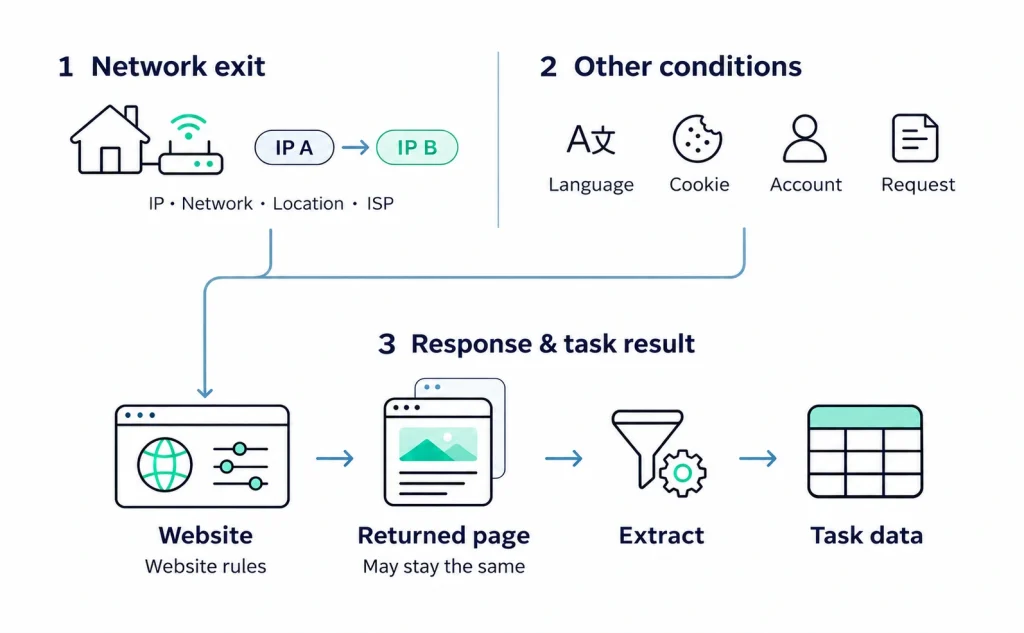
A residential proxy directly changes the network exit used to reach a website. Switching to a new residential exit changes the IP address, network type (home broadband), location, and ISP that the target site detects.
While websites rely on these network signals to serve regional content, they also read other data sent with your request. Your browser language, saved cookies, login status, and account region settings remain in your local environment—they do not reset automatically just because you switched proxy IPs.
Because of this, changing your residential exit only changes one part of the visit. You can break down how a webpage result is formed across three levels:
| Level | What to Check | Why It Matters for Your Task |
| Network Exit | Actual exit IP, network source, city, and ISP | Confirms whether the proxy provided the required network environment |
| Local & Account Context | Browser language, cookies, request headers, and logged-in account | Shows whether local cache or account settings are overriding your IP location |
| Website Response & Parsing | Returned page content and your data extraction rules | Confirms whether you captured the target information and completed the task |
Suppose you switch your proxy to a residential exit in a target city, but the website still shows content for your previous location. That alone does not mean the residential proxy failed.
Start by checking an IP lookup tool to confirm your request actually exited through the target city. If the exit IP is correct, check whether the site is prioritizing your logged-in account address, browser language, or stored cookies—or whether the site simply serves the exact same page to both regions (websites may also use third-party IP geolocation databases that differ slightly from your proxy provider’s labels). Finally, verify that your extraction rules are parsing the returned page properly; a broken parser cannot be fixed by adding more residential IPs.
Separating these three levels gives you two practical rules of thumb: First, a correct exit IP means your network condition is in place, not that the webpage is guaranteed to change. Second, an unchanged webpage does not mean the proxy failed to switch IPs. Pinpointing whether the issue lies in the network exit, local browser state, or data parsing tells you what to adjust next instead of blindly swapping proxies.
Things to Keep in Mind Before Using Residential Proxies
Connection and session changes: Residential exits rely on real household devices and home internet lines, so their online status and speed can fluctuate. If a home node goes offline mid-task, the service will either assign a new IP or return a connection error depending on your session settings. Independent requests can simply retry, but a multi-step task that requires a consistent IP may need to restart. Also, a sticky session only means keeping the same IP during the current window—it does not reserve that specific home IP for you next week.
Traffic consumption and actual cost: Residential proxies are typically billed by data traffic (per GB). Loading image-heavy pages uses far more data than fetching plain text or API responses, and frequent retries or high request volumes will add to your total usage. Because billing rules for upload and download traffic vary by provider, estimate your cost based on the total traffic needed to finish your workload rather than comparing per-GB sticker prices alone.
Resource sourcing and transparency: Because residential exits run through household connections, it is worth checking how a provider sources its network, whether participants join with informed consent, and whether they can opt out at any time. Public compliance pages offer a starting point, but look for clear explanations of how the network is maintained.
When Should You Use a Residential Proxy?
Which Tasks Actually Require a Residential Network?
Deciding whether to use residential proxies comes down to the operational requirements of your task:
- Tasks that require a real home broadband source: If you need to observe how a website behaves on consumer home networks or test a specific residential ISP (such as reproducing regional loading issues or viewing pages restricted to household traffic), a residential proxy provides direct value.
- Tasks spanning multiple regions or carriers: When your research covers several countries, cities, or ISPs and requires switching exits from a unified gateway, residential proxies are well suited.
- Tasks that only need a standard regional IP: If the target website does not restrict datacenter traffic and a standard regional IP returns the pages you need, lower-cost datacenter proxies are usually sufficient.
- Tasks that require the exact same IP long-term: If your workflow depends on keeping a single fixed IP across weeks or months (such as IP allowlisting or maintaining a fixed login environment), look for static ISP proxies rather than relying on temporary sticky sessions from a dynamic residential pool.
What to Check Before Scaling Up
Once you confirm your task needs residential proxies, verify five things before running at scale:
- Whether active online nodes are available in your target countries, cities, and ISPs.
- Whether the rotation options and sticky session duration fit your task steps.
- Whether connection speed and stability can support your workflow from start to finish.
- Whether projected data usage—including page weight and retries—fits your budget.
- Whether the provider clearly explains how its residential resources are sourced.
The simplest approach is to run a small pilot test using a real task. If the returned pages do not match what you expect, use the three-level table in the previous section to check whether the discrepancy comes from the exit IP or your local browser state.
Conclusion
A residential proxy lets your browser or application route requests through real household broadband connections around the world. Its core value lies in combining genuine residential network sources, multi-region and ISP coverage, and centralized exit management. By understanding how the network exit interacts with your local browser state—and matching the proxy’s capabilities to your actual workload and traffic budget—you can choose the right setup for your project.
Frequently Asked Questions (FAQ)
Do I need to install hardware in the target location to use a residential proxy?
No. The proxy provider already aggregates available household connections into a unified service. You simply enter the provider’s gateway address into your local browser or software to route traffic through residential exits in your target region.
Does a residential proxy automatically change my IP on every request?
Not necessarily. When your exit IP changes depends on your session settings. You can set it to rotate to a new home IP on every request, or use a sticky session to keep the same household exit for a set period during multi-step tasks.
Are "static residential proxies" the same as real residential proxy exits?
Usually not. Products labeled “static residential proxies” in the market are typically static ISP proxies—their IP addresses are registered under broadband carriers, but the servers are hosted in datacenters rather than running through home routers (for a detailed breakdown, see ISP Proxies vs. Residential Proxies).
Does a provider's advertised total IP pool size equal the number of IPs I can use right now?
No. Total pool size usually reflects the cumulative number of addresses connected over a period of time. The number of IPs you can actually use at any given moment depends on how many household nodes are actively online in your target city and ISP.